Review & Approval
Approvals that don't live in your inbox.
Church copy needs eyes on it: a ministry leader, a campus pastor, sometimes the whole staff. ChurchCopy puts review, comments, statuses, and approvals on the copy itself, so nothing gets approved in a hallway on Sunday morning.
7-day free trial · No credit card required
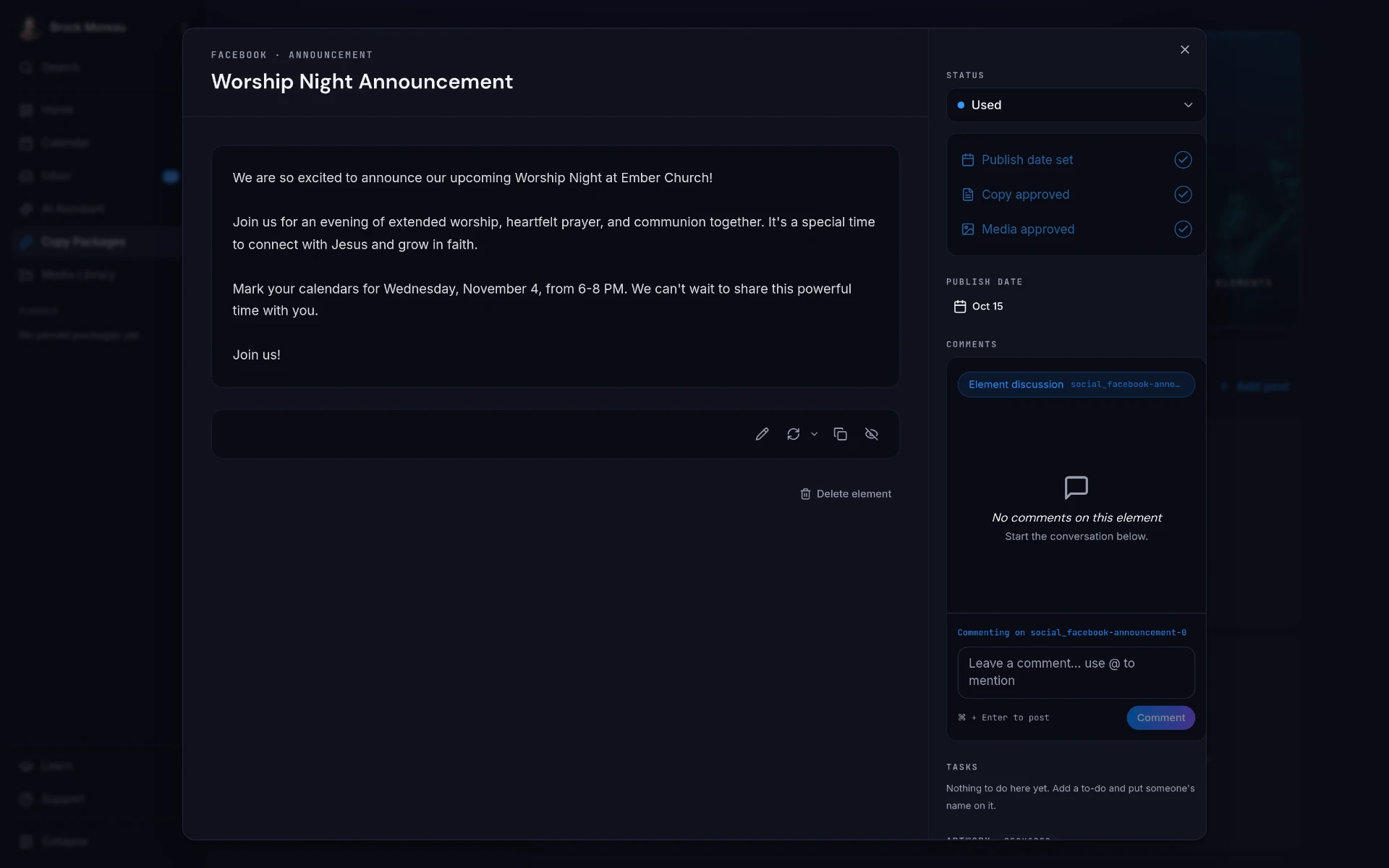
ChurchCopy replaces email-thread approvals with in-app review: each piece of copy carries a status, comments, assigned tasks, and an approval step, and viewers can be invited for free.
Approval is where church comms stalls.
The writing is rarely the bottleneck. Getting a yes from the right person, before the deadline, is.
Feedback is scattered
Notes arrive by text, email reply, doc comment, and hallway conversation. Someone has to reconcile all of it.
Nobody knows the status
Is this approved? Did the pastor see it? Was the photo swapped? There's no single place that answers it.
Approval bottlenecks
When review happens in email threads and hallway stops, the one person who can say yes becomes the bottleneck. Copy waits on them, not the calendar.
Last-minute scrambles
Copy gets approved hours before it publishes, which means typos ship and artwork goes missing.
Everything decided on the copy itself.
Each item in a copy package carries its own review trail so the whole team can see exactly where it stands.
Clear statuses
Draft, pending, approved, visible at a glance for every piece in the package.
Comments in context
Feedback sits on the copy it refers to, not in a thread someone has to dig through.
Assigned tasks and checklists
Assign artwork, set the publish date, and check off copy and media approvals before anything goes out.
Unlimited free viewers
Pay only for the people who create content and use the AI Chat Assistant. Unlimited viewers can view and copy content at no cost.
Three steps, start to sent.
Instant team visibility
Every generated package is immediately accessible across your workspace. No emailing links, exporting files, or forwarding threads.
Collect feedback in place
Comments, tasks, and artwork requirements all attach to the item.
Approve and publish
Lock the publish date once copy and media are both approved.
See it in ChurchCopy.
Every package you're working on, one click away.
Once copy is approved, it lives right on your dashboard with the rest of your packages, and you can start the next event, sermon recap, or quick message from the same screen.
- An Event
- Sunday's Sermon
- A Quick Message
- All Your Packages
How teams actually use it.
Comms Director
See every item waiting on approval instead of chasing people for replies.
Lead Pastor
Review and approve the week's messages from a free viewer account.
Volunteers
Pick up assigned artwork tasks as a free Pro viewer.
Review & Approval : common questions
How do church teams approve communications in ChurchCopy?+
Every piece of copy carries a status, comments, assigned tasks, and separate copy and media approval checks. Once both are approved, the publish date is locked in.
Do reviewers need a paid seat?+
No. Viewers are unlimited and free. They can view and copy content. Free viewers come with ChurchCopy Pro. Commenting, approving, creating content, and using the AI Chat Assistant require a Pro collaborator seat.
Can we assign tasks to team members?+
Yes. Tasks like artwork, photography, or a final read-through can be assigned inside the copy package and checked off there.
Does it replace our project management tool?+
For communications work, usually yes. Instead of tracking copy in a separate board, review, comments, statuses, and to-do lists live on the copy itself.
Explore more of the workspace
All featuresDashboard
A clean home screen: pick an event, Sunday's sermon, or a quick message and start writing, with every package you're working on right below.
Learn moreAI Chat Assistant
A faith-aligned chat assistant grounded in your mission, voice, values, and AI policy, not a blank prompt box.
Learn moreCopy Packages
Describe an event once and build every core message, campaign asset, ad, recruitment piece, and send date as one organized package.
Learn moreReady to simplify your message?
Start free for 7 days. No credit card required.